Watch
See it in 28 seconds. One link, every card, the answer in ₹.
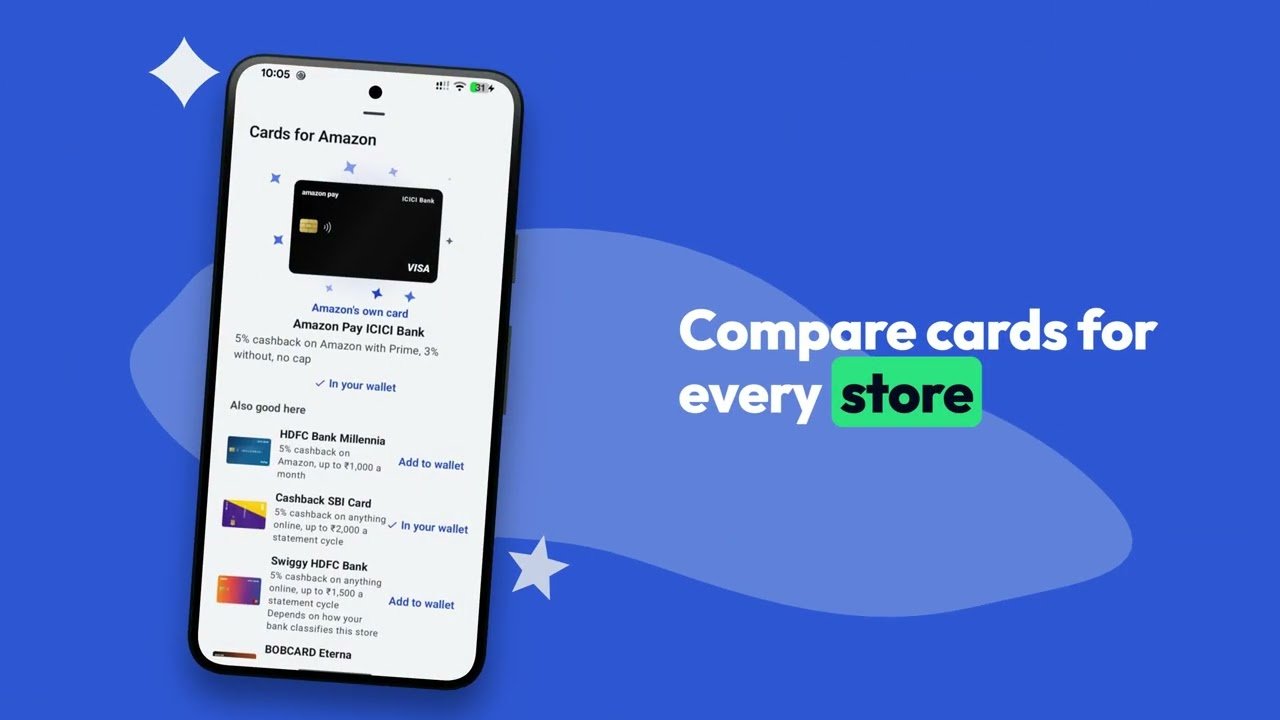
A product link goes in, the store's page is read on the phone, and the card that saves most comes out in front, with what it saves and why.
How it works
Three taps, and you know what to pay with.
Nothing to set up beyond ticking the cards you already carry.
-
Share a link
From Amazon, Flipkart, Myntra, Croma and nine more — or any shopping site you add yourself. No link handy? Type what you are looking for and Card Juggler searches the shops for you.
-
Your phone reads the page
The store's own page opens in a hidden browser inside the app, with your pincode filled in, and the price and every bank offer are read from it. Our server never sees the link.
-
The best card, with the reason
Your cards ranked by what each one really saves on this order, in rupees — instant discount, bank cashback and card rewards added up, caps and minimum spends included.
Caps and minimums
The best card changes with the price.
A card that wins a ₹20,000 order can lose a ₹60,000 one. Offers stop at a limit, rewards hit a monthly cap, and a minimum spend switches an offer on. Slide the order and watch the ranking move. Card Juggler does this sum for every card you own, on the real page, every time.
- HDFC Millennia₹2,500₹1,500 off (the offer's limit) + ₹1,000 CashBack (its monthly cap)
- Amazon Pay ICICI₹1,2505% back with Prime, no cap
- Cashback SBI Card₹1,2505% cashback
The offer puts HDFC Millennia in front.
An example: Amazon with Prime, and a 10% HDFC Bank offer of up to ₹1,500 on orders of ₹5,000 or more. The cards' own rewards are the app's rules for them; in the app, the offers are read off the real page.
Sale planner
Every big sale, planned before it starts.
A sale brings bank offers of its own, and they change which card wins. The planner lists every sale coming up, with your best card for each of its stores at the order size you pick, and what that saving is made of.
- Sales and their offers are added as they're announced, and reach your phone without an app update.
- If a card you don't have would beat your wallet by ₹250 or more, it says which, before the sale.
- Remind me puts the start in your phone's own calendar.
10% instant discount up to ₹1,750 on SBI cards, but not the Cashback SBI Card, on orders of ₹5,000 or more
- AmazonAmazon Pay ICICI₹1,500 back, 5% with Prime₹1,500Next: Cashback SBI Card, ₹1,500
10% off up to ₹1,500 on HDFC Bank credit cards on Flipkart; ₹1,000 off on Axis Bank credit cards on ₹15,000 or more
- FlipkartHDFC Millennia₹1,500 off + ₹1,000 CashBack, at its cap₹2,500Next: Flipkart Axis Bank, ₹2,450
- MyntraFlipkart Axis Bank₹1,000 off + ₹2,175 cashback₹3,175Next: Cashback SBI Card, ₹1,500
An example: two sales with the kind of offers banks run on them, and the wallet from the top of the page, with Prime. The cards' rewards are the app's own rules for them. In the app, the sales are the real ones.
Buy now, or wait New
A sale is coming. Would it beat your card?
When a sale on that store starts within three weeks, its announced bank offers are ranked on this very product with your own cards, the same sum as the check. If they would beat your card today by ₹100 or more, the product says so, with the figure.
- Lowest you've seen, under the price: the lowest your phone has seen the product at, when, and its price over time. With instant alerts on, what other phones shared counts too.
- Remind me puts the sale's start in your calendar. See the sale opens the planner.
- On sale day it says what the price was before the sale, if your phone saw a lower one in the month before. A deal marked up the week before is the oldest trick there is.
Flipkart Tablet, 11", 128 GB
On the page: 10% instant discount up to ₹1,500 on HDFC Bank credit cards
Starts in 6 days. Its bank offers would save ₹2,450 with HDFC Millennia on today's price, ₹1,425 more than your best card today.
Remind meSee the saleThe planner's wallet and its Flipkart sale, on a product with no offer on its page today. The same sum as the check: the sale's offer comes off first, and the card's reward is on what is paid.
Jugaad
No offer on it? There's usually a jugaad.
Most products carry no bank offer at all. That is when the genie gets to work: gift cards that put one order on two or three cards, where the store's own balance takes them, a voucher that sells below face value, a coupon, a UPI offer. Each one is measured against your best card, every card's cap included, and only shown when it truly wins.
Your card already did the jugaad. I'm on a break.
Two cards, with a gift card
Cashback SBI Card stops earning at ₹2,000. So buy ₹50,000 of Flipkart gift cards with it on magicpin, 1% off, and pay the rest with HDFC Millennia.
* SBI's terms don't promise cashback on gift cards; cardholders get it. Check your statement.
The app's own sum, on a ₹1,02,579 graphics card on Flipkart with no bank offer: the gift cards go into your Flipkart balance, which pays first at checkout.
Make it yours
Your wallet, your way.
Your cards live in a wallet you pick: leather, a quilted clutch or a slim card holder, lying flat or standing up, stacked, fanned or tidy. Tap a card to take it out, give them a shuffle, or empty it, if you dare. The app's three looks are on this page too: try them with Theme, at the top.
Behind your cards
Three things your cards do that aren't a saving.
Tucked in the wallet behind your cards: a boarding pass, a collector's card and a coupon. Each is the way into a screen of its own. Prefer paper? Settings can draw all three as hand-written notes.
Lounges: which card gets you in
Every card's lounge terms, from the bank's own page: how many visits, where, and the spend that unlocks them, with this quarter's dates. Sorted by least spend, least spend a visit, or most visits. Tick off the visits you've used. It never says "you're eligible": it can't see what you've spent.
Your collection, rated out of 100
Premium cards, lifetime free ones, rare ones and how many banks: four parts of 25, so every kind of wallet has something to show. Each card stands on a lit glass shelf in a trophy cabinet that tilts with your phone. Share the cabinet; nothing else leaves it.
Paisa Vasool
What a card does that its holder doesn't know: two offers that add up on one payment (Visa's 10% off on Blinkit on top of a debit card's own 5%), a perk most holders miss, and where a card doesn't earn. Each one quotes the bank's or the network's own terms, and you can say whether it worked.
No Android phone? All three are on Which card?, with the sale planner, for an iPhone or a laptop. Your cards stay in your browser. To read first: lounge access by card, bank offers right now, the Paisa Vasool tips.
Family wallets New
Your cards, and the family's.
The card that wins is often in somebody else's wallet. Share my cards sends your card names as a link; their phone keeps them as a wallet of its own, with your name on it, and every check ranks your cards and theirs together.
- Card names only. There is nowhere to type a number.
- Share again and their copy updates, rather than a second wallet turning up.
- Only your own cards are ever shared, never the ones shared with you.
- Leave a wallet out of checks on the days that card isn't to hand.
Your own cards are in every check.
- Ravi's Amazon Pay ICICI5% back with Prime, no cap₹3,000
- Cashback SBI Card5%, stopped at its ₹2,000 cap₹2,000
- HDFC Millennia5%, stopped at its ₹1,000 cap₹1,000
Ravi's card saves ₹1,000 more than your best one. Ask Ravi.
An example, with Prime. The rates are the app's own rules for these cards. * Tata Neu's 5% on Croma depends on how the shop bills the card, so the app marks it as a maybe.
What else it does
Everything around the answer, on your phone.
All of it from the same pages you would have seen yourself.
No link? Type what you want
Words instead of a link, and each shop you pick is searched with its own search box, sites you added included. Tap a result for the card check.
- Your PC shop1TB NVMe SSD, PCIe 4.0₹6,199
- Amazon1TB NVMe SSD, PCIe 4.0₹6,349
- Flipkart1TB NVMe SSD, PCIe 4.0₹6,499
Cheaper elsewhere? Same size, or it says so
One tap asks the other shops for the same product: same model, same colour, same size. A 50 ml tube is never passed off as the 200 ml bottle.
- Amazon200 ml · this page₹349
- Flipkart200 ml · ₹20 cheaper₹329
- Nykaa200 ml · ₹16 more₹365
- Flipkart300 ml · ₹153 per 100 ml · cheaper per ml₹459
- Nykaa50 ml · ₹198 per 100 ml · costs more per ml₹99
Share a deal
Send a link to the product, its price in each shop and the one card that saves most on it. Nothing else from your wallet goes with it.
 A deal, checked with Card Jugglercardjuggler.com/app/p/…
Buy where you're signed in
Buy opens the store in the app, the best card kept in view to checkout, or hands the product to the store's own app.
The page's coupon, typed in for you
A coupon printed on the product page is kept while you shop on to the bag, where one tap types it into the store's own box. The page is never touched until you tap.
What your cards saved
Tag what you bought, and your history adds it up: how many, since when, and what your cards saved on them. From your own history alone; no store's order list is read.
6 bought since 12 Sep · your cards saved ₹4,120
Compared with the right shops
A kurta found on Amazon is looked for on the fashion stores, a charger on the electronics ones. The product's name decides, and you can add any shop by hand.
- Flipkart
- Myntra
- AJIO
- Tata CLiQ
- Nykaa
Your pincode, not Mumbai's
Stores assume a Mumbai pincode until told otherwise, which changes the price, the stock and the offers. Card Juggler types yours into the store's own box first.
Missing a card? Ask for it
Request a card, or tell us one is wrong. Each is checked against the bank's own page, and the fix reaches every phone without an app update. New launches are looked for every week.
Search results, priced after your card
Turn on With my cards and every result's price is what your best card leaves to pay, the shop's bank offers read from each page, so "Cheapest first" means cheapest for you.
Back in stock
A watched product that sold out says so, with the day, instead of "couldn't read the page", and you get a notification when it's back, at the price it's back at.
Meme sounds, if you like
Coins ringing, notes fanned, a card sliding into leather: our own, and off until you turn them on. Silent whenever your phone is.
Price alerts
It watches the price, so you don't.
Tell it the price you would pay. It checks while you get on with your day, and taps you on the shoulder the moment the store gets there — with the best card's offer already taken off.
- Amazon every hour, other stores every three hours, every half hour on sale days.
- Instant alerts, if you turn them on: phones share the store prices they read, and nothing about who read them. When one sees a drop on a product you watch, yours reads the page itself before it tells you.
- Buy straight from the notification.
Price drop · Galaxy S25 UltraNow ₹1,04,999 on Flipkart, ₹5,000 lower. With your best card: ₹1,00,999.Buy on Flipkart
Stores
The stores it knows, and the card for each.
Each one read the way that store actually works, with fixes reaching the app without waiting for an update. Where a store has a card of its own, tap it: these are the cards worth having there, held or not.
Everything
Fashion & beauty
- Nykaa
Electronics
Groceries
- Blinkit
- Zepto
Cards worth having on Amazon
- HDFC Millennia5% cashback · up to ₹1,000 a month
- Cashback SBI Card5% cashback · up to ₹2,000 a statement cycle
By rate, from the app's own rules for each card. A cap is said, never added up: this is before any price.
A page for each: the best card for every shop, and every card the app knows.
Add your own shops too — a PC parts site, a local electronics shop — and they are read and price-compared like the rest.
Privacy
Your cards stay on your phone.
This is the whole design, not a setting you have to find.
Never leaves your phone
- The cards you tick — names only, never numbers
- Your pincode
- The products you watch and tag
- The links you check, and what you browse in the Shop tab
- Websites you added yourself
There is nothing to leak
- No account, no sign-up, no email
- No card number, expiry, CVV, PIN or OTP — there is nowhere to type one
- No analytics, no advertising, no tracking libraries
- Uninstalling deletes the lot
Only when you tap Share does anything of yours reach our server: the one product and card you chose to share, or your card names for the family, and nothing else. It is deleted when the link runs out. Instant alerts, if you turn them on, share store prices with nothing that identifies your phone, and a thumb on a Paisa Vasool tip sends the tip and the thumb, nothing else.
Questions
Asked often.
The short answers. The long ones are in the privacy policy and on the support page.
Is Card Juggler free?
Yes, and there are no ads. The ranking is the same sum for every card, and nothing pays to move a card up it.
Does it need my card number?
No. You tick card names from a list, like "HDFC Millennia" or "Cashback SBI Card", and they are saved on your phone only. There is nowhere in the app to type a card number, expiry, CVV, PIN or OTP.
How does it know the offers?
It opens the store's own product page in a hidden browser inside the app, on your phone, and reads the price and every bank offer off it: the same page you would see. Our server never sees the link.
What each card earns on top comes from the card's published terms, checked against the bank's own site.
Which stores and cards does it know?
Thirteen stores are built in: Amazon, Flipkart, Myntra, AJIO, Tata CLiQ, Nykaa, Croma, Reliance Digital, JioMart, BigBasket, Blinkit, Zepto and Swiggy Instamart. You can add any other shopping site yourself, and it is read and price-compared like the rest. Swiggy and Zomato are there as a bill: type what you're paying and see which card.
382 cards from 34 banks, each with its fees and lounge rules, 326 of them with reward rules checked against the bank's own terms. Missing one? Ask for it in the app.
Can my family use my cards?
Yes. In My Cards, Share my cards makes a link with your card names, never numbers. Their phone keeps them as a wallet of its own with your name on it, and ranks your cards alongside theirs, so a check says "Ravi's Amazon Pay ICICI" when that one wins. Share again later and their copy updates.
The link works once and runs out after an hour, a day or a week, as you choose. Only your own cards are ever sent, never ones shared with you.
Where do the sale offers come from?
Each big sale and its bank offers are added as they are announced, and reach your phone without an app update. On a product page, the page's own offers always count first; a sale's offers only fill in where a page shows none, as Myntra's and the grocery apps' pages don't until checkout.
What are instant alerts?
A way to hear about a drop sooner, off until you turn it on. Phones that turn it on share the store prices they read: the store, the product and the price, and nothing that identifies the phone. When one reports a drop on a product you watch, your phone reads the page itself before it tells you, so a wrong report can't set off an alert. Reports are deleted after three days; only the lowest price for a product each day is kept, for six months, to draw its price over time.
Does it know the UPI and fintech-app cards?
Yes: PhonePe's HDFC Bank and SBI cards, Kiwi, super.money, Scapia, Google Pay Flex, Jupiter Edge, slice, Fibe, CRED, ixigo, Fi, Tiger, POP-CLUB, Uni, CheQ, SalarySe and more. Each is filed under the bank that issues it, so that bank's store offers reach it.
A card that earns only on UPI scans through its own app (Zagg, Roarbank, BharatPe, ZET) earns nothing on an online card payment, so it is ranked on the store's bank offers alone.
Where does a product's price over time come from?
From what your phone has seen: each check of the product, and the background reads if you watch it. With instant alerts on, the lowest price other phones shared each day is drawn in too, and the line says so. A product checked once has no history yet, so nothing shows until there is something to tell.
Which of my cards gets me into a lounge?
Each card's lounge rules are in the app, from the bank's own page: visits a quarter or a year, in India, abroad or at railway stations, and the spend that unlocks them, said with this quarter's dates ("if you spent ₹60,000 on it from Jul to Sep"). The Lounges screen lists your cards under "No spend needed", "After a spend" and "You pay to get in", or sorted by least spend, least spend a visit or most visits, and shows every card the same way, with its fee, for whoever wants one. It can't see your spends or how many visits you've used, so it never says you're eligible; it says the condition.
What is Paisa Vasool?
Tips about what a card does that its holder doesn't know, in three kinds: a double dip, two offers paid by two different people on one payment (Visa's own 10% off on Blinkit on top of a Kotak 811 debit card's 5%); a hidden perk the terms give and nobody mentions; and a watch out, where a card earns nothing. Every tip quotes the bank's or the network's own terms, and the app works a double dip out on your order with the same sums as a product check. A thumb up or down sends the tip and the thumb, nothing else, and what people say worked is listed as Trending and Most liked.
What is my collection score?
Your wallet rated out of 100, in four parts of 25: premium cards (by the bank's list price), lifetime free ones, rare ones (invite-only, metal, no longer issued) and how many banks. Debit cards count for rarity and spread only. If a bank gave you a card free, tick "Mine is lifetime free" and it counts. It's for showing, not for saving; the cabinet it's shown in can be shared as a picture.
Is there an iPhone app?
No. Card Juggler is for Android phones, Android 7.0 and up. On an iPhone or a laptop, Which card? on this site ranks your cards for a shop, by rate or on a price you type, with the sale and weekly bank offers we know of, and since October 2026 also has the sale planner, Paisa Vasool for your cards, your collection score and the lounges list, with the app's own sums. It can't read a store's own page; the app does.
What if an amount looks wrong?
Offers change often, so always check the final amount at checkout. If a card's rate is wrong, tap "Something wrong with this card?" on it in the app, or write to support@cardjuggler.com. We check it against the bank's terms, and the fix reaches every phone without an app update.
Can I change how it looks?
Yes. The app has three looks, Classic, Rupee note and Monochrome, each in light or dark, and a choice of wallet for your cards. The looks are on this page as well: press Theme at the top.